A non-technical guide to the technologies powering your application — React, Next.js, Tailwind CSS, Supabase, and Stripe — explained in terms anyone can understand.
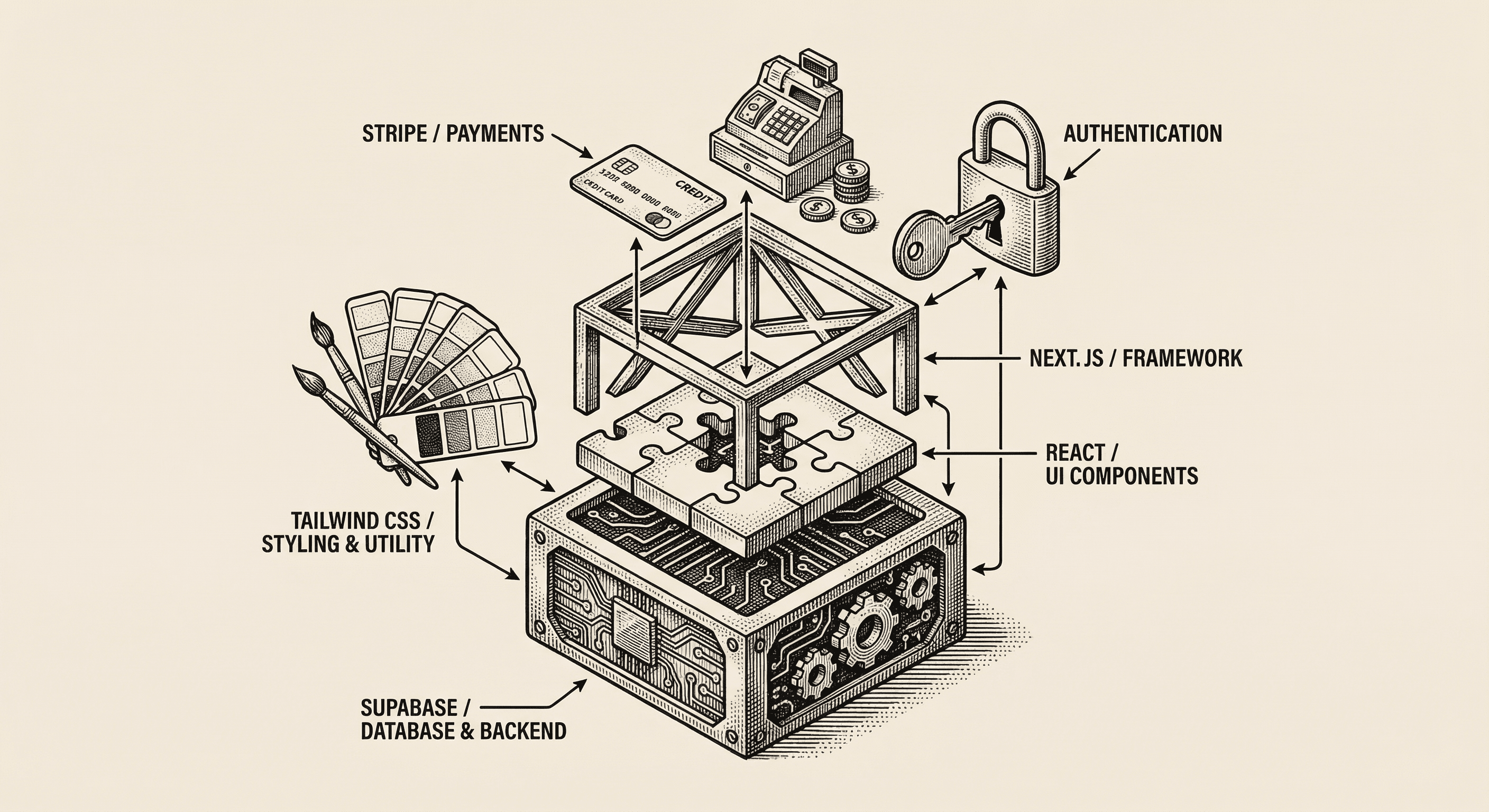
When you look at the list of technologies in your project, it can feel overwhelming. React, Next.js, Tailwind CSS, Supabase, Stripe — what are all these things, and why do you need them?
Think of building a web application like building a house. You do not manufacture your own bricks, wire your own electrical systems, or forge your own nails. You use established materials and tools that experts have already created and refined. Your tech stack is the collection of proven tools that handle the hard engineering so you can focus on building your product.
Let us walk through each one.
What it is: A library for building user interfaces, created and maintained by Meta (Facebook).
What it does for you: React lets you build your application's screens out of reusable pieces called "components." A button is a component. A navigation bar is a component. A user profile card is a component. You build small pieces and then assemble them into complete pages.
Why it matters: Before tools like React, building interactive interfaces was chaotic. Every change to the screen required carefully updating the page by hand. React handles all of that automatically — when your data changes, the screen updates to match. This is the same technology that powers Facebook, Instagram, Airbnb, Netflix, and thousands of other products.
The analogy: React is like a set of LEGO bricks. Each brick (component) has a specific shape and purpose. You can snap them together in different combinations to build anything from a simple wall to an elaborate castle. And if you need to change one brick, the rest of the structure stays intact.
What it is: A framework built on top of React, created by Vercel. It adds the features React needs to become a complete web application.
What it does for you: React alone can build interfaces, but it does not know how to handle things like:
/about vs. /pricingNext.js adds all of this and more. It is the backbone of your application.
Why it matters: Without Next.js, you would need to choose, configure, and connect dozens of separate tools to get the same capabilities. Next.js gives you a single, cohesive system where everything works together out of the box.
The analogy: If React provides the LEGO bricks, Next.js is the instruction manual and the baseplate. It tells you where to put the pieces, provides the foundation, and ensures the finished structure is solid.
What it is: A utility-first CSS framework for styling your application.
What it does for you: Tailwind gives you a set of pre-built design building blocks — colors, spacing, typography, shadows, borders, and layouts — that you combine to create any visual design. Instead of writing custom style code from scratch, you apply small, descriptive labels to your elements.
For example, rather than writing a custom style that says "make the text large, bold, and dark gray with some space below it," you apply labels like text-xl font-bold text-gray-800 mb-4. Each label does one thing, and you combine them freely.
Why it matters: Tailwind solves one of the biggest challenges in building products — maintaining visual consistency. Because you are drawing from a fixed set of sizes, colors, and spacing values, your application naturally looks cohesive. There is no more guessing about whether to use 14 pixels or 16 pixels for body text, or which shade of blue to use for links.
The analogy: Tailwind is like a well-organized paint set with pre-mixed colors that all look good together. You do not need to be a color theory expert to create something visually appealing — just pick from the palette.
What it is: An open-source backend platform that provides a database, user authentication, file storage, and real-time capabilities.
What it does for you: Supabase handles the complex infrastructure that every web application needs:
Why it matters: Building authentication and database systems from scratch is one of the most time-consuming and error-prone parts of creating a web application. Getting security wrong can expose your users' data. Supabase gives you a battle-tested foundation that handles these critical pieces correctly.
The analogy: Supabase is like a managed storage facility with a security guard at the front door. It keeps everything organized, only lets authorized people access their own units, and handles the maintenance so you do not have to.
What it is: The world's most popular payment processing platform for internet businesses.
What it does for you: Stripe handles everything related to accepting money online:
Why it matters: Handling payments is heavily regulated and incredibly complex. You need to comply with PCI DSS (Payment Card Industry Data Security Standard), handle edge cases like failed charges and disputed transactions, and ensure money flows correctly. Stripe abstracts all of this behind a clean interface.
The analogy: Stripe is like hiring an experienced cashier and accountant in one. They handle the register, count the money, issue receipts, deal with returns, catch counterfeit bills, and file the paperwork — you just tell them what you are selling and for how much.
Here is how a typical interaction flows through your tech stack:
Each tool does its part, and together they form a complete, production-ready web application.
Here is the most important thing to understand: you do not need to become an expert in any of these technologies to build your product. This template has already connected and configured everything for you.
What you should focus on:
The tech stack is your foundation. It is solid, proven, and ready to support whatever you build on top of it.
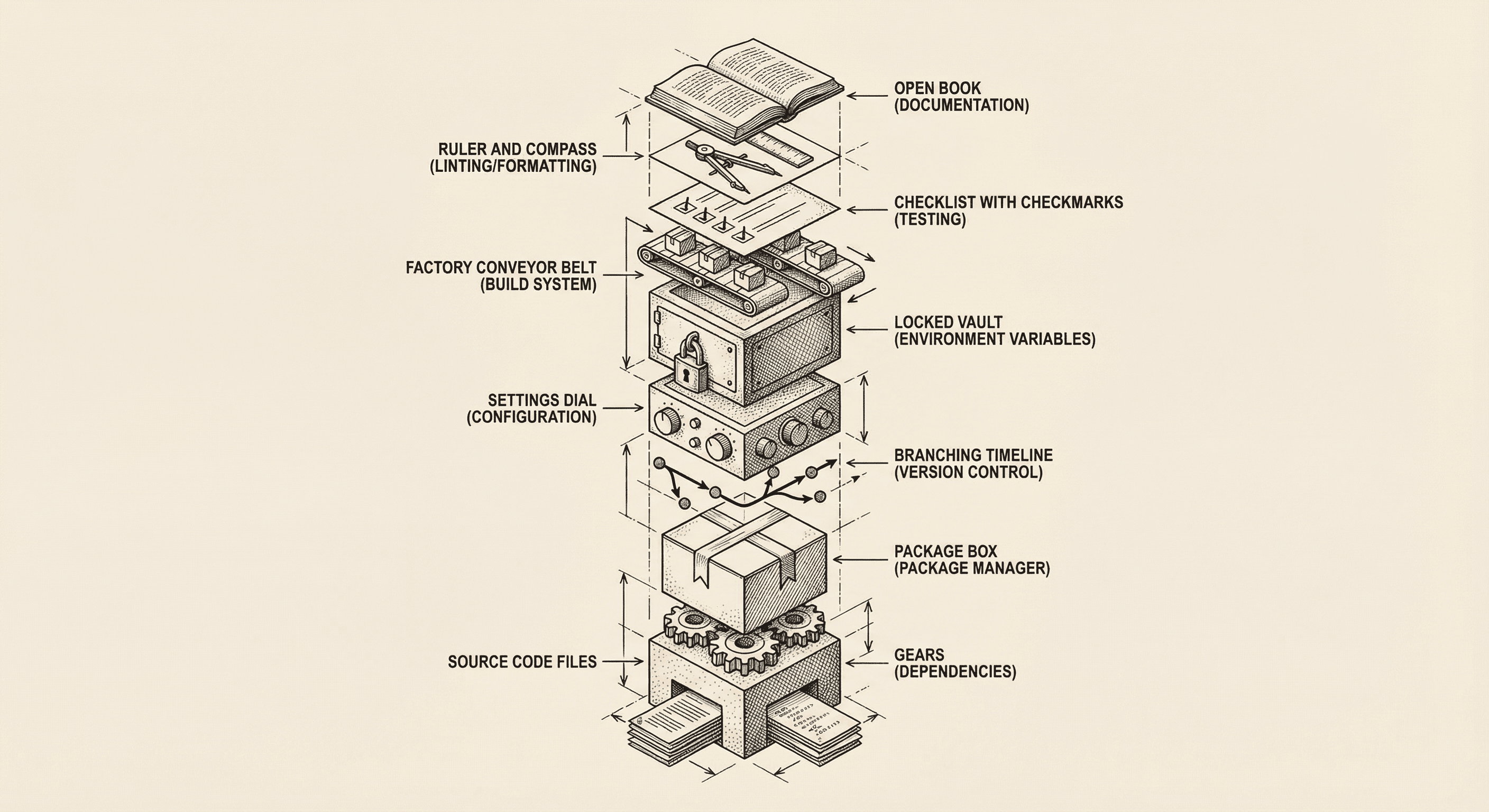
Every software project — from a weekend side project to a billion-dollar platform — shares the same fundamental building blocks. Here is what they are and why each one exists.

Understand the difference between websites and web applications, how they work under the hood, and why this matters for the product you are about to build.
